GfxSpeConvertor
Version of program 0.01.
The program written by Aprisobal. Algorithm of envelope
to 3-Colour by Aprisobal. Algorithms of envelope to GigaScreen, DoubleMC(MCX), MC and Normal Screen by Alone Coder.
About program:
- It's converting the PC's picture formats:
- Windows Bitmap (*.bmp)
- JPEG (*.jpg)
- CompuServe GIF (*.gif)
- TIFF images (*.tif; *.tiff) uncompressed, LZW compressed
- SGI black & white images (*.bw)
- SGI RGB images (*.rgb)
- Autodesk CEL files (*.cel)
- Autodesk PIC files (*.pic)
- Truevision images (*.tga; *.vst; *.icb; *.vda; *.win) uncompressed, RLE compressed
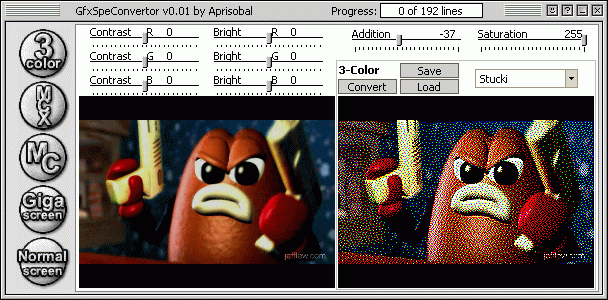
- automatically changes picture's resolution to 256x192;
- regulation of brightness of source pictures of each channel;
- regulation of contrast of source pictures of each channel;
- regulation Saturation and Addition;
- previews converted pictures;
- saves and loads Speccy's images;
Screenshot of program:
How to view at Speccy:
How to see 3-Color's picture see at ZX-Format 6. How to print
MultiColor's picture see at ZX-Review 96/4-5. About DMC and GigaScreen
see at Speccy magazines or ask friends.
How to copy to real Speccy:
- Execute Spectrum Navigator (Spectrum Navigator, please, get from http://www.sn.nnov.ru);
- Choose file (*.$c, *.scr and etc...) and write at Speccy's diskette.
From experience of use program:
- Try to avoid big amount of white colour, accordingly better little more black colour:)
- Source pictures imperfect and at first thought black colour in convertation it is converted in coloured pixels. Try to change brightness under such upshot. (ScrollBar's Bright, Contrast and other).
Download program available here (It's size is 422Kb): GfxSpeConvertor v0.01.
14.08.2003 Aprisobal